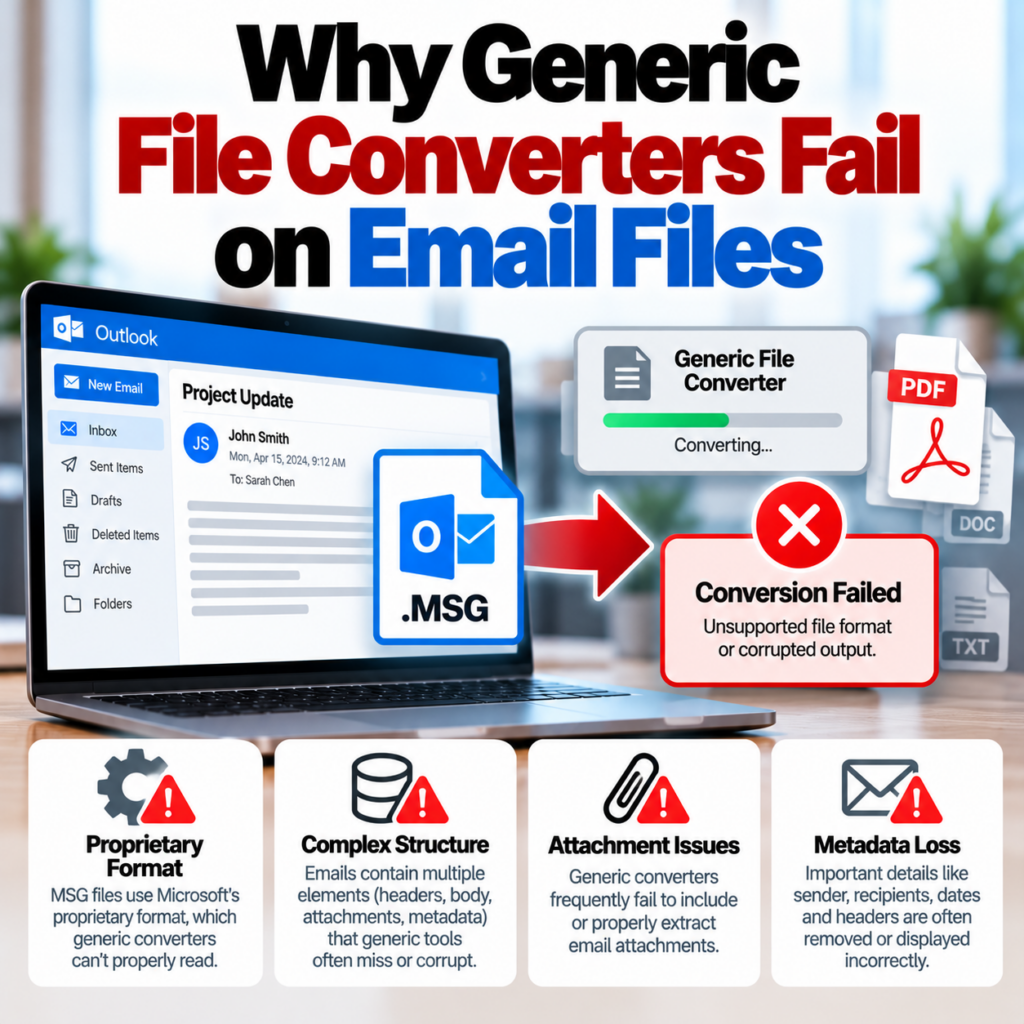
You upload an MSG or EML file to a general-purpose converter — Zamzar, CloudConvert, Online-Convert — and get back a garbled PDF. Or an error. Or a PDF that contains only the raw text of the email without any formatting, missing the From/To/Date header block entirely. Or one that renders the HTML body but shows none of the metadata you actually needed.
This isn’t a bug in those tools. It’s a structural mismatch between what those tools are built to do and what email files actually are. Understanding why generic converters fail on email formats — and what a purpose-built converter does differently — explains why the output quality difference is so dramatic.
What Generic Converters Are Actually Built For
Tools like Zamzar, CloudConvert, and similar services are document converters. They convert between document formats — Word to PDF, PDF to Word, EPUB to MOBI, image formats to each other, and so on. Their core capability is rendering: they take a file, render its visual content, and output that rendering in a different format.
This works well for documents because documents are primarily visual artifacts. A .docx file contains text, formatting, images, and layout information. The goal of converting it to PDF is to preserve that visual output. The converter renders the document and produces a PDF that looks like the original.
Email files aren’t documents in this sense. They’re structured data containers — and the structure is what matters most.
What MSG and EML Files Actually Contain
An MSG file is Microsoft Outlook’s proprietary binary format. It’s based on Microsoft’s Compound Document File Format (also called OLE2 or Structured Storage), which is the same container format used by old-style Office documents. Inside that container, an MSG file stores:
- Properties — a set of named values including From, To, CC, BCC, Date, Subject, Message-ID, and dozens of other fields, each identified by a numeric property tag
- The message body — potentially in multiple formats: plain text, HTML, and sometimes Rich Text Format (RTF), stored separately
- Inline images and embedded objects, stored as sub-objects within the container
- Attachments, each stored as their own sub-object with their own properties
- Transport headers — the raw SMTP header block showing how the message was routed
An EML file is simpler in structure — it’s a plain text file following RFC 5322, the standard for internet message format. But “simpler” doesn’t mean easy: EML files use MIME encoding (Multipurpose Internet Mail Extensions) to contain multiple parts. A single EML file can hold plain text body, HTML body, inline images, attachments, and all headers — each encoded according to MIME rules, often with base64 encoding for binary content, and sometimes with quoted-printable encoding for text.
Both formats require specific parsers to read correctly. They’re not just documents — they’re structured containers with their own internal logic.
Why Generic Converters Get It Wrong
They don’t parse the binary structure
General-purpose converters don’t have an MSG parser. When they receive an MSG file, they typically try to render it the same way they’d render a document — which means looking for content they can display. What they usually find is either nothing useful (and return an error) or a partial rendering of some text content they manage to extract.
The Compound Document File Format that MSG files use has a specific internal directory structure. Reading it correctly requires walking the FAT (File Allocation Table) within the container, parsing each property’s type and value according to the property tag specification, and assembling the results into a coherent email structure. Generic converters don’t do this.
They miss the header metadata
Even when a generic converter manages to extract and render the email body, it almost always loses the header metadata — From, To, CC, BCC, Date, Subject. These fields are stored as properties inside the MSG structure (or as header lines in EML), separate from the body content. A converter that doesn’t understand email structure has no way to know what to do with these properties, so they’re either lost entirely or rendered incorrectly.
The BCC field is particularly vulnerable. Even Outlook’s own print-to-PDF function often drops BCC because it’s rendering what’s displayed on screen, and Outlook typically hides BCC from the normal message view. A purpose-built converter reads BCC directly from the file’s property store, where it’s always present on the sender’s copy of the message. Generic converters don’t reach this level of the file at all. For the most complete header output, see the MSG to PDF converter, which reads all properties from the raw file.
MIME encoding is not straightforward to parse
EML files use MIME encoding, which is significantly more complex than it appears. A multipart MIME message has nested boundaries — a top-level boundary separates the parts, and each part can itself be multipart. Character encoding varies per part (UTF-8, ISO-8859-1, and others). Binary content is base64-encoded, and text content may be quoted-printable encoded. Inline images have Content-ID references that are linked to HTML using cid: URLs.
A generic converter seeing an EML file often strips out MIME boundaries and grabs whatever text is between them — missing the encoding declarations, incorrectly handling multi-byte characters, and losing all the inline image references. The output is text without context.
HTML email rendering requires a full HTML engine
Most email bodies are HTML. But email HTML isn’t normal web HTML — it uses inline styles, table-based layouts, and techniques designed to work across dozens of email clients with inconsistent rendering. Rendering email HTML correctly requires an engine that handles the quirks of email HTML: inline style inheritance, fixed-width table layouts, specific image handling.
Generic converters that do attempt to render the HTML body often use a simple HTML-to-PDF pipeline that doesn’t account for email HTML conventions. The result is a poorly formatted rendering that doesn’t look like the email as originally composed.
What Happens in Practice
The failures you’ll see when using Zamzar or similar tools on email files:
- Error or blank output: The converter can’t parse the binary MSG format at all and either errors out or returns an empty PDF.
- Raw text dump: Some converters extract whatever text they find and produce a PDF of it — no formatting, no headers, no structure. You get the body text but not the email.
- Missing metadata: The converter renders the body but drops From, To, Date, Subject. The output doesn’t look like an email at all.
- Broken HTML rendering: The email body renders but the formatting is wrong — images missing, layout broken, text encoding garbled.
- Mangled attachments: Attachment references appear as raw base64 strings rather than organized attachment listings.
Any of these outputs is unusable for purposes where the email needs to look like an email — which is most of the actual use cases: sharing with someone who needs to read it, using it as documentation, submitting it as evidence.
What a Purpose-Built Email Converter Does Differently
A converter built specifically for email files implements the full parsing stack:
Binary format parsing for MSG
A proper MSG parser reads the Compound Document File Format structure from the ground up — walks the internal directory, identifies each stream and storage, and extracts properties by their MAPI property tags. This gives access to every field in the file: all recipient types (To, CC, BCC), the sender information, the timestamp, the complete subject, and body content in all available formats (plain text, HTML, RTF).
MIME parsing for EML
A proper EML parser understands MIME boundaries, handles character encoding declarations, base64-decodes binary content, processes inline image CID references, and reassembles the multi-part structure into a coherent representation. The EML to PDF converter handles these encoding layers so the output correctly reflects the original email.
Email-specific PDF layout
The PDF output from a purpose-built converter looks like an email, not a generic document. It includes a structured header block showing From, To, CC, BCC, Date, and Subject. The body renders correctly, preserving the email’s original formatting. Attachment filenames are listed. The output is immediately recognizable as an email record.
Metadata completeness
For legal, compliance, and eDiscovery purposes, metadata completeness is the whole point. A purpose-built converter makes all the available metadata accessible — including fields that Outlook’s own print function omits. See the eDiscovery guide for what completeness means in a production context.
The File Format Determines the Right Tool
This is a straightforward matching problem. Different file formats require different parsers. General-purpose tools are built around document and media formats. Email formats are different enough — both structurally and in what a “correct” conversion means — that a specialized tool is the appropriate choice.
It’s the same reason you wouldn’t use a document converter to open a database file, or an image editor to read a spreadsheet. The tool needs to match the format. For MSG and EML files, that means using an email-native converter rather than a general-purpose one.
The MSG vs. EML guide covers the format differences in more detail — useful if you’re dealing with files in both formats and need to understand which converter handles which.
When It Matters Most
For casual use — just wanting to quickly read an email you can’t open — a partial output from a generic converter might be enough. If you can see the body text, you know what the email said.
But for most of the common reasons people convert email files to PDF, output quality matters a lot:
- Legal and compliance: Headers and metadata are part of the record. A PDF missing the From, Date, and BCC fields isn’t a useful exhibit.
- Sharing with clients or counterparties: The PDF needs to look like a professional email record, not a text dump.
- Long-term archiving: If you’re archiving email correspondence, you want complete PDFs that will still make sense years later.
- Bulk conversion: At scale, output inconsistency compounds. A bulk converter built for email files produces consistent output across hundreds or thousands of files. The same can’t be said for a generic tool that struggles with the format.
Format note: This applies equally to MSG files (Microsoft Outlook’s binary format) and EML files (the RFC 5322 open standard). Both require email-specific parsing. Generic converters typically fail on both, though the failure mode looks slightly different for each format — MSG often produces errors or empty output; EML may produce garbled text because some generic tools can partially read the plain-text wrapper.
Quick Summary
- Generic converters are built for documents, not email containers
- MSG files use a binary compound format requiring a MAPI property parser
- EML files use MIME encoding with multiple layers that require proper parsing
- Missing headers, broken formatting, and garbled output are the predictable results of using the wrong tool
- Purpose-built email converters read the format correctly and produce complete, usable PDFs
See the FAQ for answers to common questions about conversion quality and format support.
Have MSG or EML files that need to become proper, readable PDFs? Use a converter built for email formats — not a generic document tool.Convert Email Files to PDF →